TaxCycle 15.1.60925.0—Email Integration Update
This update resolves the email connection issues discovered in the previous release. It also adds several customer requests.
To install this version immediately, download the full installer from our website or request a free trial. Once we enable the automatic update for this version, TaxCycle will prompt you to install it according to the priority set in your TaxCycle Options. (To deploy auto-update files from your network, see the Auto-Update Files page.)
Release Highlights
Status of T1/TP1 Forms
The Canada Revenue Agency (CRA) has certified TaxCycle T1 for filing of T2203 Provincial and Territorial Taxes for Multiple Jurisdictions and provincial 428MJ forms.
You can file business and rental statements (T776, T2042, T2121, T2125, T1163, T1273), excluding forms and worksheets related to CCA as we implement calculation changes for the Reaccelerated Investment Incentive Property (RIIP) measures proposed in federal Bill C-15. Wait to file any business and rental statements that include CCA claims for new equipment or vehicles acquired during the year.
The following forms still show the Preview watermark due to ongoing work:
- The CCA form for T2125, T2042, T2121, T1163, T1273, T776
- T777, TP-80 and TP-128 (as the CCA tables are integrated in these forms)
- Forms related to the capital gains deduction (T657 and TP-726.7)
We expect these forms to be ready for filing in our next release, scheduled for mid-March.
All other T1/TP1 forms are final.
T2SCH572 Update
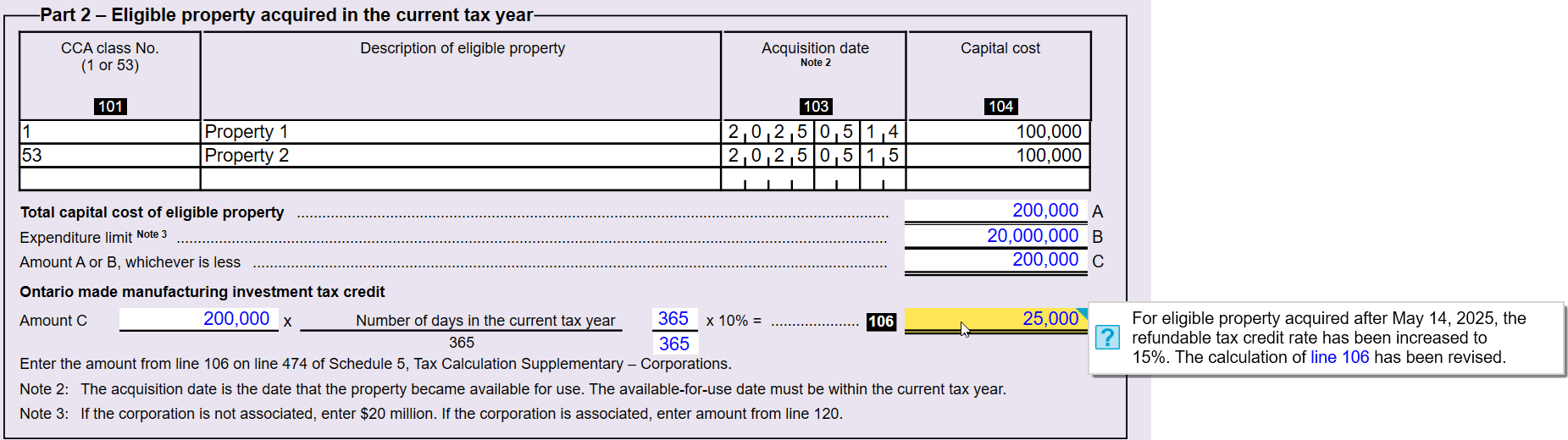
Schedule 572 Ontario Made Manufacturing Investment Tax Credit
In TaxCycle version 15.0.60095.0, we updated Schedule 572 to allow an additional 5% increase (from 10% to 15%) for eligible property that becomes available on or after May 15, 2025.
The CRA has requested that we remove these new fields and instead only revise the calculation on line 106 to incorporate the new 15% refundable tax credit. As such, we have reverted the changes previously made to Schedule 572.
If there is an acquisition of eligible property after May 14, 2025, TaxCycle will revise the calculation of line 106 to include the refundable tax credit calculation of 15%.
Email Integration Update
This update resolves the connection issues with Gmail® and Microsoft 365® (Outlook) discovered in the previous release.
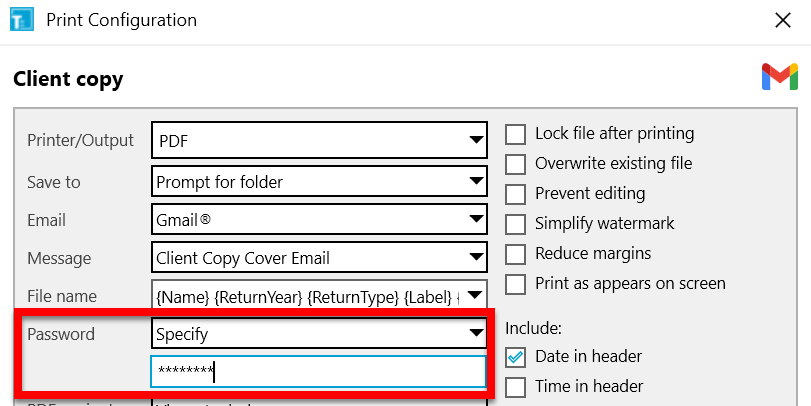
This update also adds support for emailing password-protected PDFs to clients using both Gmail and Outlook. It also allows you to email images from templates.
For instructions on connecting your personal email account to TaxCycle, see the Gmail® Integration and Microsoft 365® (Outlook) Integration help topics.
If you are using a professional (work or school) Microsoft account, please refer to the How to Connect Your Organization’s Microsoft Account to TaxCycle help topic.
Template Updates
- Customer Request T1—TaxCycle now masks the SIN by default in the 2025 pre-season (PreSeason) and 2024 post-season (PostSeason) letters.
- Customer Request T1—Updated references to the GST/HST credit in the 2025 client (CLetter) and joint client (JLetter) letters to “Canada Groceries and Essential Benefit (formerly the GST/HST credit)."
- Customer Request T1—Fixed the year in the principal residence section of the 2024 and 2025 English post-season letter to refer to 2025.
Resolved Issues