TaxCycle 15.1.60757.0—Gmail® and Microsoft 365® (Outlook) Integration
This release adds Gmail® and Microsoft 365® (Outlook) email integrations to TaxCycle. It also resolves issues discovered since the last release.
To install this version immediately, download the full installer from our website or request a free trial. Once we enable the automatic update for this version, TaxCycle will prompt you to install it according to the priority set in your TaxCycle Options. (To deploy auto-update files from your network, see the Auto-Update Files page.)
Release Highlights
Status of T1/TP1 Forms
The Canada Revenue Agency (CRA) has certified TaxCycle T1 2025 for electronic filing of the T1134 Information Return Relating to Controlled and Not-Controlled Foreign Affiliates. Read the T1134 EFILE help topic to learn how to electronically file the T1134 with the CRA.
This release removes the Preview watermark from the following forms:
- All business and rental statements (T776, T2042, T2121, T2125, T1163, T1273) excluding forms and worksheets related to CCA as we implement calculation changes for the Reaccelerated Investment Incentive Property (RIIP) measures proposed in federal Bill C-15. Wait to file any business and rental statements that include CCA claims for new equipment or vehicles acquired during the year.
- T2203 Provincial and Territorial Taxes for Multiple Jurisdictions and provincial 428MJ forms. While the watermark has been removed, these forms are not yet certified for EFILE. Wait to file any returns that include these forms. We expect them to be ready for filing in our mid-March release.
The following forms still show the Preview watermark due to ongoing work:
- Some forms related to capital gains (T657, T936, T1237, T2017, T2048, TP-726.6, TP-726.7, TP-726.20.2)
- T777 Statement of Employment Expenses. The CRA plans to issue a revised form that includes RIIP provisions and asks that you wait to file any T777 that includes a CCA claim for new equipment or vehicles acquired during the year.
All other T1/TP1 forms are final.
Status of T3/TP-646 Forms
This release removes the Preview watermark from the following forms:
- All business and rental statements (T776, T2042, T2121, T2125, T1163, T1273) excluding forms and worksheets related to CCA as we implement calculation changes for the Reaccelerated Investment Incentive Property (RIIP) measures proposed in federal Bill C-15. Wait to file any business and rental statements that include CCA claims for new equipment or vehicles acquired during the year.
All other T3/TP-646 forms are final.
New! Gmail® and Microsoft 365® (Outlook) Integration
This release adds the ability to connect Gmail and Microsoft 365 (Outlook) accounts directly to TaxCycle.
You can now connect to these services when printing a form or return, allowing you to email the generated PDF directly to the recipient from TaxCycle.
Sending batch emails via Gmail or Outlook from the Client Manager is not supported at this time.
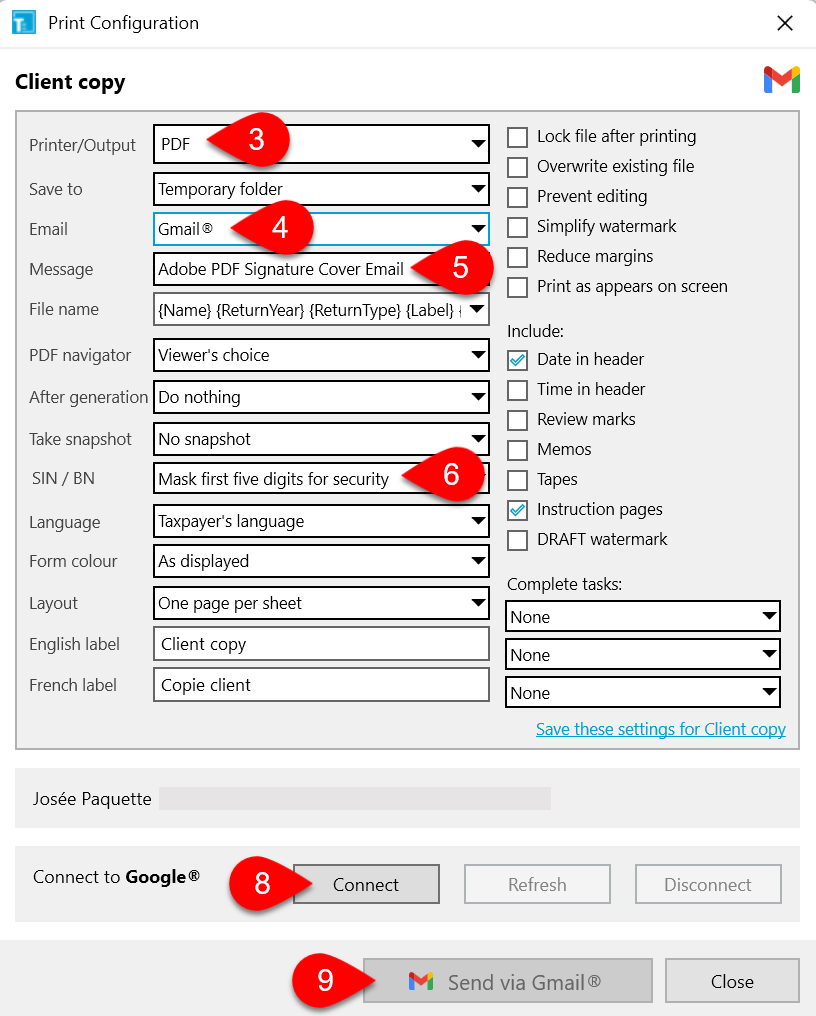
- Open a form in TaxCycle.
- Press Ctrl+Shift+P, click Print/PDF Form in the Tools menu, or right-click on the form and select Print/PDF Form. (If configuring a print set, click the edit link for the print set in the Print/PDF sidebar.)
- From the Printer/Output menu, select PDF.
- From the Email menu, select Gmail® or Microsoft 365® (Outlook).
- Select a template from the Message menu. TaxCycle uses the subject line from the template as the Email notification subject line when sending the email to the client. The text in the template body is included as part of the Email notification body.
- From the SIN/BN menu, select Mask first five digits for security to obscure social insurance numbers and business numbers from the forms. (We strongly recommend using this option when sending documents for signatures.)
- Set any other PDF options as required.
- Click Connect to open your web browser and sign in to your email account.
- Click Send via Gmail® or Send via Microsoft 365® (Outlook) to email the PDF to your client.
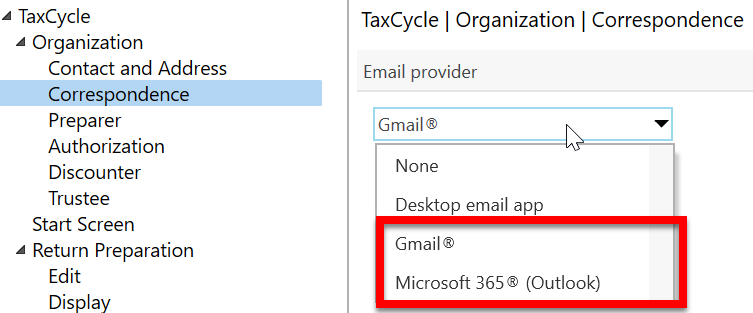
You can also select Gmail or Outlook as your default email provider from the dropdown list in Correspondence Options.
To learn more, see the Gmail® Integration and Microsoft 365® (Outlook) Integration help topics.
Template Updates
- Customer Reported T1 2025—Removed the age and disability tax requirement from the Canadian Dental Care Plan paragraph in the client letter (CLetter) and joint client letter (JLetter).
- Customer Reported T1—Removed the checkbox about the digital news subscription tax credit from the 2025 pre-season (PreSeason) and post-season letter (PostSeason) and the 2024 post-season letter, since the credit does not apply for tax year 2025 onwards.
Customer Requests
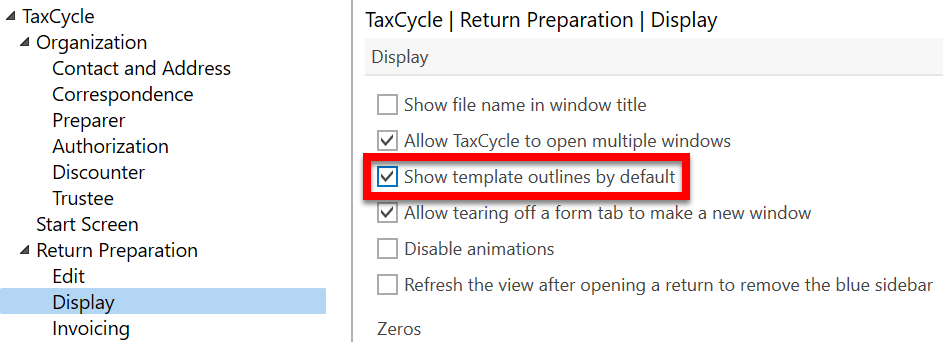
- TaxCycle Options—Added a new checkbox in Display options to show the template outlines by default.
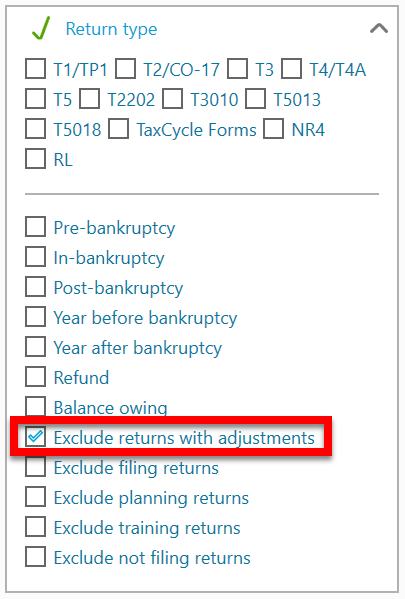
- Client Manager—Added a new custom filter to Exclude returns with adjustments from searches. With this filter enabled, TaxCycle removes original returns from view if there is an adjustment, ensuring only the most recently adjusted return remains visible for carry forward.
Resolved Issues
Status of File Carryforwards from 2024 to 2025
As of this release, all 2024 to 2025 carryforwards are up to date.
- T1/TP1—TaxCycle, ProFile®, Taxprep®, Cantax®, DT Max®
- T2/CO-17—Carryforwards from TaxCycle, ProFile®, Taxprep®, Cantax®, DT Max®, creating files with year ends up until May 31, 2026.
- T3/TP-646, RL-16—Carryforwards from TaxCycle, ProFile®, Taxprep®, Cantax® and DT Max®
- T4, T4A, RL-1/RL-2—TaxCycle, ProFile®, Taxprep®, Cantax®
- T4PS—TaxCycle, ProFile®, Taxprep®, Cantax®
- T4A-RCA—TaxCycle, ProFile®
- T5, RL-3—TaxCycle, ProFile®, Taxprep®, Cantax®
- T5013/TP-600, RL-15—TaxCycle, ProFile®, Taxprep®, Cantax®
- T5018—TaxCycle, ProFile®, Taxprep®, Cantax®
- T2202—ProFile®, Taxprep®
- T3010/TP-985.22—TaxCycle, ProFile®, Taxprep®, Cantax®
- NR4—TaxCycle, ProFile®, Taxprep®, Cantax®
- Forms—TaxCycle, ProFile®, Taxprep®, Cantax®
- RL—TaxCycle, ProFile®, Taxprep®, Cantax®