This release rolls over the TaxCycle Forms module to 2026. It also adds the ability to edit emails before sending.
To install this version immediately, download the full installer from our website. Auto-updates are published at the same time as the full setup. TaxCycle will notify you of the new version right away and handle the installation timing according to the priority set in your TaxCycle Options. (To deploy auto-update files from your network, see the Auto-Update Files page.)
This release rolls over the TaxCycle Forms module to 2026, allowing you to create a 2026 forms collection. Please note the following:
You can carry forward 2025 TaxCycle Forms files and files from ProFile® and Taxprep®.
You can create Forms files from other 2026 TaxCycle modules.
We have updated the following forms to the latest version:
FIN146 Authorization or Cancellation of a Representative
FIN542P Logging Tax Return of Income for Processors
FIN542S Logging Tax Return of Income
GST20 Election for GST/HST Reporting Period
GST44 GST/HST Election Concerning the Acquisition of a Business or Part of a Business
GST190 GST/HST New Housing Rebate Application for Houses Purchased from a Builder
RC7190-ON GST190 Ontario Rebate Schedule
GST191 GST/HST New Housing Rebate Application for Owner-Built Houses
GST524 GST/HST New Residential Rental Property Rebate Application
GST525 Supplement to the New Residential Rental Property Rebate Application – Co-op and Multiple Units
RC65 Marital Status Change
RC66 Canada Child Benefit Application includes federal, provincial, and territorial programs
RC66SCH Status in Canada and Income Information for the Canada Child Benefit Application
RC243-SCH-A Schedule A - Excess TFSA Amounts
RC243-SCH-B Schedule B - Non-Resident Contributions to a Tax-Free Savings Account (TFSA)
RC7191-ON GST191 Ontario Rebate Schedule
RC7524-ON GST524 Ontario Rebate Schedule in Preview mode
T1521 Election for a Pertinent Loan or Indebtedness under Subsection 15(2.11)
T2311 Election for a Pertinent Loan or Indebtedness Under Subsection 212.3(11)
TP-1086 Costs Incurred for Work on an Immovable
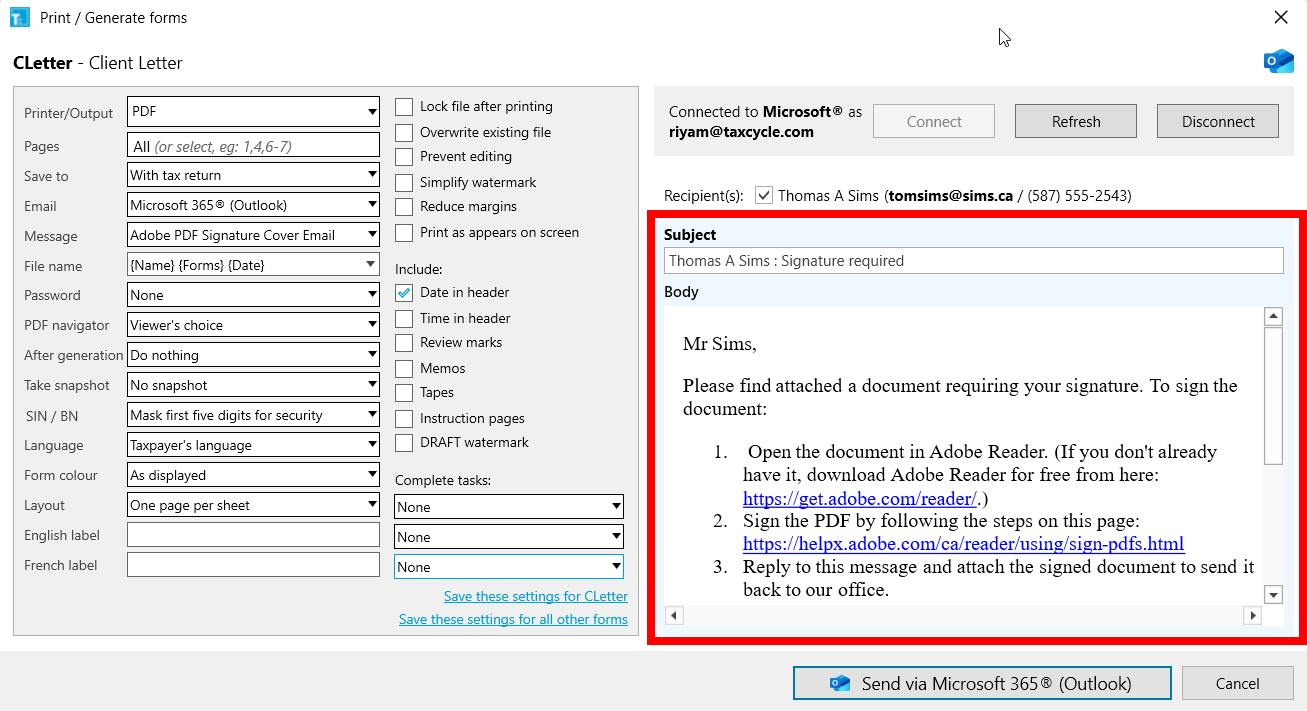
You can now edit emails in TaxCycle before sending them.
You can click the envelope icon in the Prepare sidebar to edit the contents of the email.
Edits only apply to the email that is sent. They don’t save back to the template or return.
To change the formatting of an email, use the Template Editor.

Known Issue: Unable to Insert Images or Tables into Templates
T2—The “Balance to be paid” field on COZ-1027.P now calculates from line 444 of CO-17. Previously, it was calculated from line 435 of CO-17.