TaxCycle 15.0.59548.0—2025 Slips and Relevés Carryforward, T3010 and TP-985.22 Returns
This version of TaxCycle is ready for filing T3010/TP-985.22 returns. It also allows you to carry forward 2025 slips returns from competitor software for planning and evaluation purposes. It is NOT a filing release for slips or relevés.
To install this version immediately, download the full installer from our website or request a free trial. Once we enable the automatic update for this version, TaxCycle will prompt you to install it according to the priority set in your TaxCycle Options. (To deploy auto-update files from your network, see the Auto-Update Files page.)
Release Highlights
2025 Slips and Relevés Carryforward
As of this release, you can carry forward slips returns from competitor software. This is NOT a filing release for slips and relevés modules. Use these modules for planning and evaluation purposes only.
Slips filing closes on December 22, 2025, and will reopen on January 12, 2026. See the “How to file” page from the Canada Revenue Agency (CRA) for more information.
You will need an account number and associated Web Access Code (WAC) to electronically file slips. Read the Slips Filing Web Access Code (WAC) help topic to learn more, or contact the CRA e-Services Helpdesk at 1-800-959-5525 to obtain or change your WAC while systems are closed.
The following slips and summaries have been updated to the latest 2025 versions:
- T4 and T4Summary
- T4A and T4ASummary
- T4PS
- T5 and T5Summary
- T5018 and T5018Summary
- T2200
- T2202
- NR4 and NR4Summary
- RC18
The following slips and forms are awaiting the latest versions:
- T4A-RCA
- T4A-RCASummary
- T4PSummary
T3010/TP-985.22 Ready for Filing
The federal T3010 Registered Charity Information Return and the Québec TP-985.22 are both ready for filing as of this release.
New! T3010 Online Filing
This certified release of TaxCycle T3010 supports online filing of the T3010 information return via a manual .txt file upload to the CRA’s My Business Account or Represent a Client portal.
- You need a CRA account to use this service. You can register for a CRA account if you do not have one already.
- TaxCycle only supports online filing for charities whose fiscal period ends on or after December 31, 2023 (CRA version 24).
- Charities with a fiscal period ending before December 31, 2023, must file the T3010 by paper.
The CRA recommends online filing. However, paper filing remains available.
Read the T3010 Registered Charity Information Return help topic to learn how to file using TaxCycle.
T2 Updates
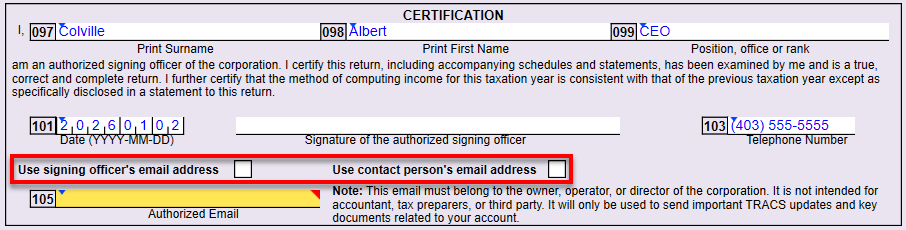
- T2—In the certification section of AT1 return, line 105 now allows you to enter an authorized email address, or use the email address of the signing officer or contact person entered on the Info worksheet. To manually enter an email address, leave both boxes unchecked.
- T2—You can now carry forward returns from the latest version of Corporate Taxprep® 2025.
Activate Your New License
If you have renewed your TaxCycle software license for the coming season, you must activate it to access to the new tax modules.
On the TaxCycle Start screen, click Activate a license to go to the Help screen. See Renewed TaxCycle? How to activate your new license to learn more.
New! Template Outlines
If you attended the Ask Us Anything webinar last month, you would have seen Cameron Peters demo a feature called Template Outlines. This underlying functionality has been available in TaxCycle for several years. However, inspired by a question at the webinar, we have recently refined it and implemented it in several templates.
Template outlines allow you to create an outline that allows the preparer to show or hide segments of the letter for a particular client. When you add or remove a segment, the body of the letter continues to update as you make data or calculation changes to the return.
If a template contains a template outline, click the link to show the outline. Once you see the outline, you can check boxes to add or remove content from the letter. 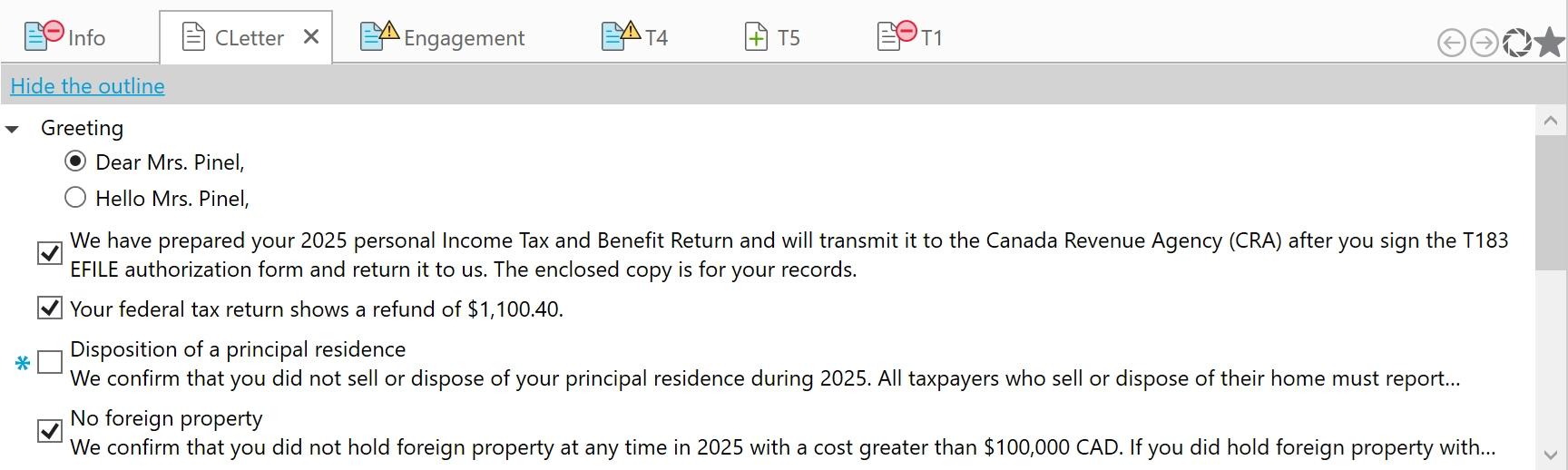
This release adds template outlines to the following templates in T1 2025:
- The client (CLetter) and joint (JLetter) letters allow you to select or exclude entire paragraphs or segments from the letters.
- The pre-season (PreSeason, JPreSeason, FPreSeason) letters allow you to add or exclude entire paragraphs or segments from the letters.
- The Closing snippet offers a choice of complementary close in the letters. This outline will show for any letter template that uses this snippet.
- The English salutation snippets (CSalutation, JSalutation and FSalutation) offer a choice of “Dear” or “Hello” as a greeting. This outline will show for any letter templates that use this snippet. The French versions of these templates do not contain a choice, as “Bonjour” is the appropriate greeting for letters in this language.
For more details on using template outlines and the code you need to add it to your templates, see the Template Outlines help topic.
We would love to hear your feedback on this new(ish) feature. In particular, whether there are other templates that we should add an outline to and why. Your feedback will help us improve the feature and offer this functionality in more places.