TaxCycle 15.1.61020.0—T1/TP1 and T2 CCA, 2026 Slip Modules
This release updates CCA calculations in TaxCycle T1/TP1 and T2 to incorporate the Reaccelerated Investment Incentive Property (RIIP) measures proposed in Bill C-15. It also rolls over T4/T4A, T5, T5018, T2202 and NR4 slips to 2026.
To install this version immediately, download the full installer from our website or request a free trial. Once we enable the automatic update for this version, TaxCycle will prompt you to install it according to the priority set in your TaxCycle Options. (To deploy auto-update files from your network, see the Auto-Update Files page.)
Release Highlights
Status of T1/TP1 Forms
The Preview watermark has been removed from the following forms:
- The CCA form for T2125, T2042, T2121, T1163, T1273, T776
- T777, TP-80 and TP-128 (as the CCA tables are integrated in these forms)
- Forms related to the capital gains deduction (T657 and TP-726.7)
All other 2025 T1/TP1 forms were finalized in previous releases.
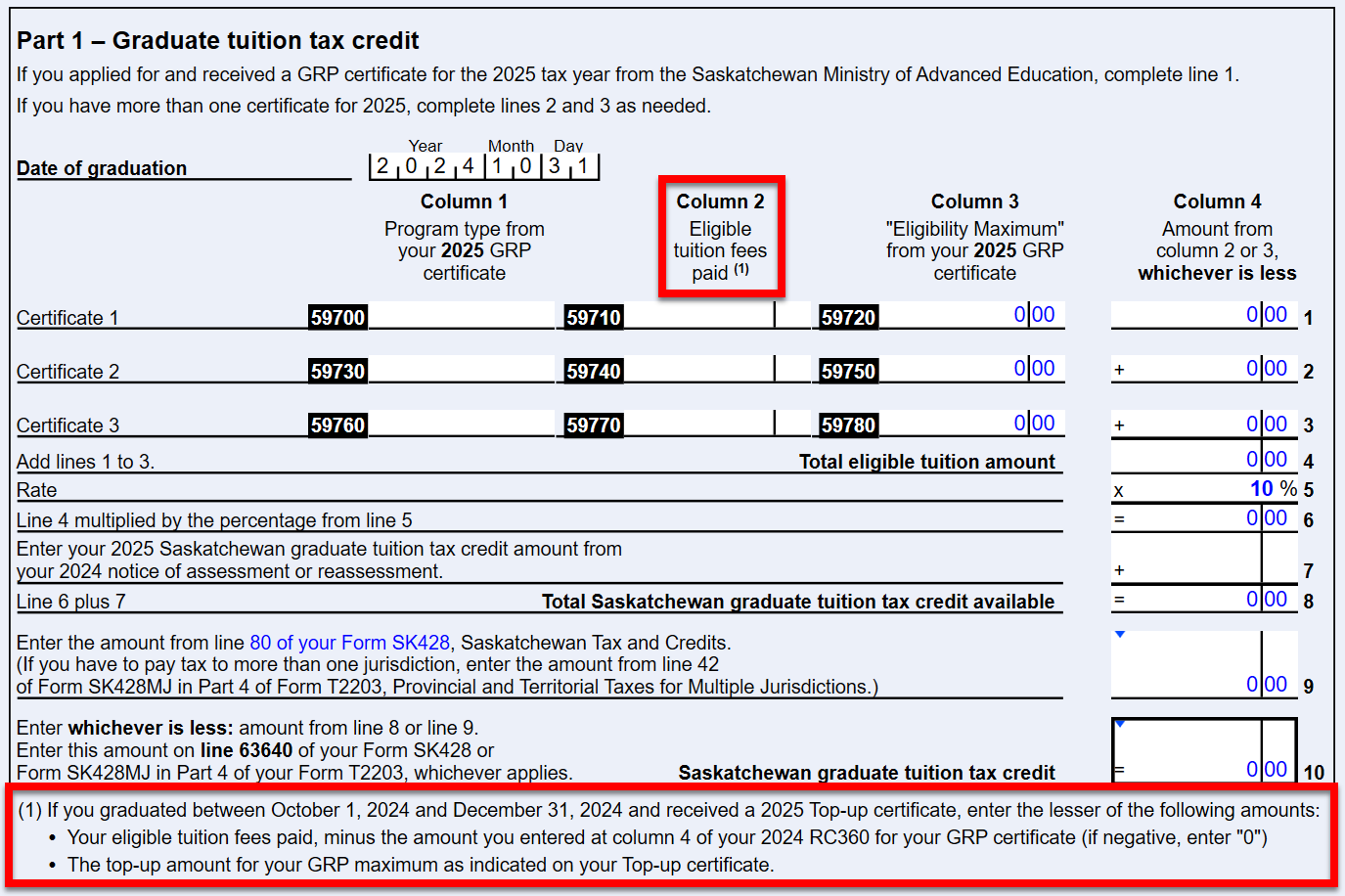
RC360 Saskatchewan Graduate Retention Program
- Updated to reflect the Canada Revenue Agency's (CRA) revised version of this form, adding instructions on how to enter the 2025 Top-up certificate issued to taxpayers who graduated between October 1, 2024, and December 31, 2024.
- Column 2 now includes a subscript that advises you to enter the lesser of two amounts:
- "Your eligible tuition fees paid, minus the amount you entered at column 4 of your 2024 RC360 for your GRP certificate (if negative, enter “0”)
- The top-up amount for your GRP maximum as indicated on your Top-up certificate"
Updates to CCA in T1/TP1 and T2
This release updates CCA calculations in both TaxCycle T1 and T2 to incorporate the Reaccelerated Investment Incentive Property (RIIP) measures proposed in Bill C-15.
The RIIP mechanics mirror existing accelerated CCA calculations by applying a relevant factor or variable to the RIIP additions, resulting in an upward adjustment to UCC for the sole purpose of calculating CCA.
We have added the variables for these calculations to the RIIPNote worksheet in TaxCycle T1, and the S8Note in TaxCycle T2.
Updated Forms
We have revised the following forms, including the related CCA and Asset Manager worksheets, to incorporate RIIP measures:
- T1: T776 CCA, T2121 CCA, T2125 CCA, T1163 CCA, T1273 CCA, T777 and T77WS, and the Motor Vehicle worksheet.
- TP1: TP-128 and TP-128 CCA, TP-80.AP Farming, TP-80.AP Fishing, TP-80 and TP-80 CCA, TP-59, TP-78, and TP-784.
- T2, AT1 and CO-17: T2 Schedule 8 and S8Asset, AT1 Schedule 13, and CO-130.A.
To learn how to apply RIIP to your client files, please refer to the Reaccelerated Investment Incentive Property (RIIP) help topic. While the examples provided are for T2 returns, you can easily adapt them for T1.
Applying Calculation Changes
When you open a file saved in a prior version of TaxCycle, you will see a message about the CCA calculation changes.
TaxCycle handles updates to the CCA calculations based on the status of the return:
- Unlocked or not completed/filed: TaxCycle automatically calculates CCA using the new RIIP rules. Click the Accept button in the red calculation changed warning message.
- “Filed,” “Completed,” or “Locked”: Calculations remain unchanged and you can apply the new calculations if you wish by first unlocking the file and then clicking the link in the related review message.
For more details on how to address these messages, see the CCA Calculation Change Messages news article.
T3 Updates
This release adds carryforward support for T3 and TP-646 reserves. It also fixes some issues related to carryforward of T3 and TP-646 returns.
Customer Request TP-1026.F Custom Worksheet
We have added a custom worksheet based on form TP-1026.F from Revenu Québec to assist in determining Québec installment amounts.
2026 Slip Modules
The new modules for T4/T4A, T5, T2202, T5018 and NR4 allow you to begin data entry for 2026 slips and related Québec RL slips. Please note the following:
- The government forms are the 2025 forms updated to include 2026 indexed amounts and budget changes announced or estimated based on the information we have at this time. A review message appears on the year-end date field and in a bulletin at the top of the forms to remind you of this.
- You can now carry forward 2025 TaxCycle files from these slips modules into 2026.
- You can use these modules to file 2026 slips now if you need to. They permit CRA Internet File Transfer (XML) and transmission of RL slips to Revenu Québec.
Template Updates
- Customer Reported T1—Updated the client letter (CLetter) and joint client letter (JLetter) to only show the Family Allowance for Québec for the spouse calculated to receive it. Also made the same change for the Alberta Child and Family Benefit.
- Customer Reported T1—Fixed an issue where the Notice of Assessment paragraph was not appearing in the joint client letter (JLetter).
- Customer Reported T1—Fixed an issue where TaxCycle automatically inserted an extra period after the Title for the Salutation field on the CSalutation, JSalutation and FSalutation letters and in client correspondence.
- Customer Request T1—The Canadian Dental Care Plan (CDCP) paragraph in the 2025 client (CLetter) and joint client letter (JLetter) now uses the adjusted net family income from the GST/HST worksheet, as well as boxes 45 on the T4 and 15 on the T4A to determine eligibility.
Resolved Issues
- Customer Reported Known Issue: Pension Splitting Paragraph in the Client Letter
- T1—Addressed an issue where line 31900, Student loan interest, would occasionally calculate a negative amount. This only occurred when line 42900, Basic federal tax, was zero but would be negative if not for the instruction on that line to enter zero if the amount calculated is negative.
- T3—TaxCycle now correctly marks the Taxable Capital Gains and Designated Net Taxable Capital Gains (TPA) form in the TP-646 print set as “used” when there are deemed dispositions.