TaxCycle 16.0.63710.0—2026 T1/TP1 Preview Rates and Forms, .NET 10 Upgrade
This release adds the 2026 T1/TP1 module with forms in preview mode and updated rates and calculations for 2026 personal tax returns. It also upgrades TaxCycle to .NET 10 and introduces changes to auto-updates and interface enhancements.
To install this version immediately, download the full installer from our website. Because auto-updates are now published at the same time as the full setup, TaxCycle will notify you of the new version right away and handle the installation timing according to the priority set in your TaxCycle Options. (See the Changes to Auto-Update section below to learn about the new update frequencies. To deploy auto-update files from your network, see the Auto-Update Files page.)
Release Highlights
.NET 10 Upgrade
This release updates TaxCycle to use .NET 10, Microsoft’s latest version of .NET that offers long-term support (LTS). This upgrade allows TaxCycle to take advantage of the performance, connectivity, and security enhancements offered in this new version of .NET.
What you need to know:
- You do not need to preinstall .NET 10. The TaxCycle setup program will automatically install .NET 10 on your system when you update TaxCycle.
- Files created and saved with the new .NET 10 version of TaxCycle remain compatible with the previous .NET version of TaxCycle.
- To ensure a smooth transition, please update your Client Manager server at the same time. This ensures searches and filters continue to work between TaxCycle and the server.
- You must also re-index the Client Manager after updating. We recommend manually re-indexing the Client Manager immediately after updating the Client Manager server. See the Indexing and Monitored Folders help topic for more details.
Changes to Auto-Update
This release changes how TaxCycle handles automatic updates. All new versions will now be published simultaneously for full setup and auto-update, meaning you will see that a new version of TaxCycle is available as soon as a release goes live.
The old frequency options (Rush, Rush plus optional updates, and Moderate) have been retired and replaced. If you were using any of those old frequencies, TaxCycle will default to the new Standard frequency. You can change this at any time in TaxCycle Options.
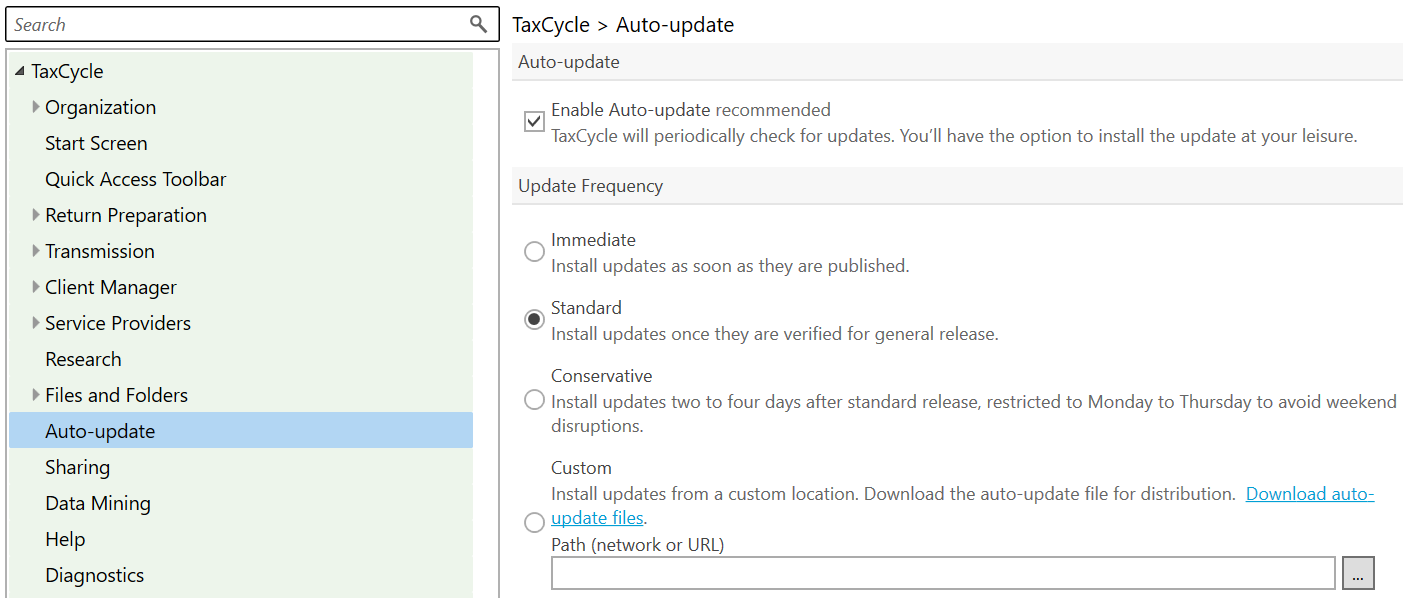
The new update frequencies determine exactly when the installer will automatically launch after you exit TaxCycle:
- Immediate: No delay. You will instantly see the “A new update is available” message. The update will launch automatically as soon as you exit TaxCycle, or you can click the message on the Start screen to install it right away.
- Standard (New Default): Schedules the update to launch on exit one to two days after release day. Until that scheduled time passes, the update will not run when you exit.
- Conservative: Schedules the update to launch on exit three to four days after release day. TaxCycle will never launch an update on exit from Friday through Sunday. For example, if a release goes live on a Monday or Tuesday, the auto-update will be installed on Thursday. If a release goes live on a Wednesday or Thursday, it installs the following Monday.
- Custom: Remains unchanged. The default is no delay if you are self hosting the update files.
If your setting includes a delay, you will see a message on the Start screen detailing exactly when the update is scheduled to install. You can click the message to install the update immediately. Once the scheduled date and time pass, the countdown message is replaced by the standard “A new update is available” message, and TaxCycle will launch the installer the next time you exit.
Start Screen and Options Updates
Based on customer suggestions, we have updated the Start screen to improve navigation and make file information easier to find. We also made some changes to the Options dialog.
- Streamlined Module Icons: The individual tax year labels that previously appeared directly under the module icons on the Start screen have been removed, creating a cleaner, more modern look.

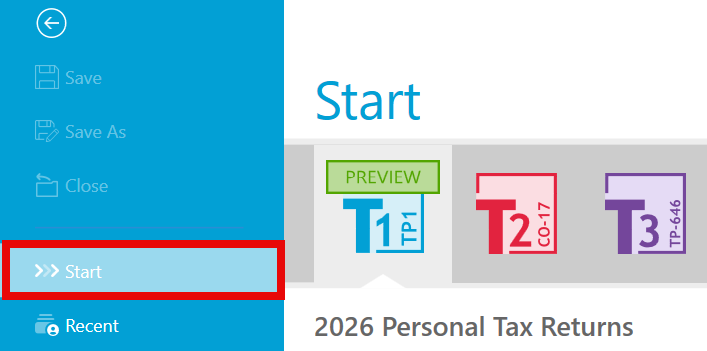
- Customer Request Start replaces File > New: When you have a tax return open and want to create or open a different file, clicking File in the blue menu bar now displays Start instead of File > New, returning you directly to the main Start screen interface.
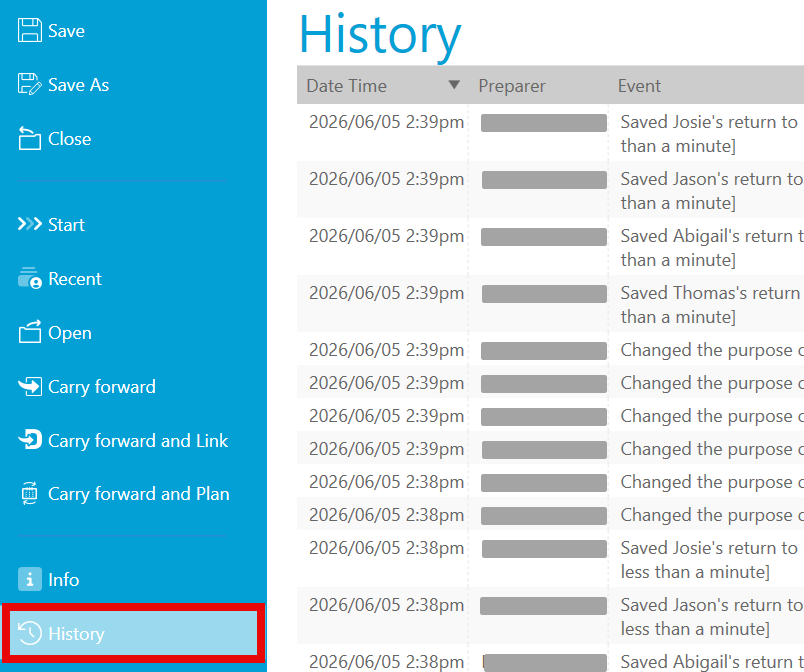
- Dedicated File History Page: To make tracking file changes easier, History has been moved out of the Info page and now has its own dedicated page in the sidebar menu.
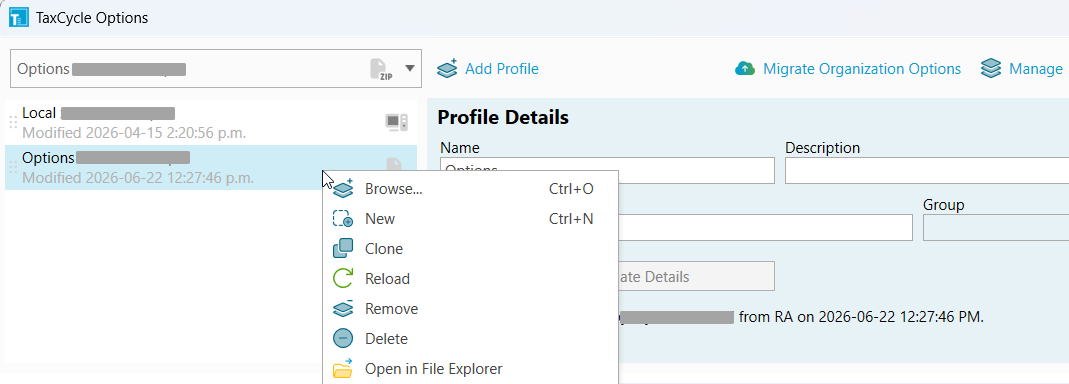
- Options Dialog Updates: The handling of Options profiles has changed, along with some layout changes in the Options dialog.
2026 T1/TP1 Preview Rates and Forms
The new TaxCycle T1/TP1 2026 module includes forms in preview mode, along with rates and calculations for 2026 personal tax returns. Use this module for planning and evaluation purposes only.
The government forms you see in the TaxCycle T1/TP1 2026 module are the 2025 forms. The amounts and rates are those already announced or that we have estimated based on information we have at this time, as well as those announced in the federal and provincial/territorial 2026 budgets.
What you need to know:
- You can carry forward 2025 T1/TP1 returns from TaxCycle. Carryforwards from ProFile®, Taxprep® and DT Max® will become available in a subsequent release. All carry forward conversions are currently under review and will be updated before the next tax season. We do not recommend batch carryforward at this time.
- Files you create now will continue to work after the module receives certification from the CRA. EFILE is not available for 2026 tax returns until February 2027.
- The CRA has not yet certified TaxCycle T1/TP1 2026 for electronic or paper filing. However, you may use it to prepare and file a deceased taxpayer’s 2026 return.
- All forms show a Preview watermark on screen and when printing, except those used for authorization and some summaries.
- If you have already purchased a 2026 TaxCycle license, you may enter a date of death in 2026, or a date of bankruptcy in 2026 and select pre-bankruptcy as the type, to remove the Preview watermark from forms. This allows you to print and paper file the T1Condensed (the bar code will not show on the form) before we release a filing version next December or January if you need to.
To learn how to create planning files, review the following help topics:
Schedule 8: New CCA Classes for Eligible Greenhouses
To align with Bill C-30, which received Royal Assent on June 18, 2026, we have added new capital cost allowance (CCA) classes 6.1 and 8.2 to the 2026 T1, T2, T3 and T5013 modules.
- Class 6.1 (10%) and Class 8.2 (20%) provide temporary immediate expensing for “eligible greenhouse buildings” acquired on or after November 4, 2025.
- Each addition must be recorded in a separate class (similar to how the class 10.1 addition is recorded).
- In the year of acquisition, the CCA amount depends on the fiscal year end. The CCA on the addition is not subject to a short fiscal year proration. The CCA rate on addition depends on the fiscal year end. If the fiscal year ends:
- before 2030: 100%,
- in 2030 or 2031: 75%,
- in 2032 or 2033: 55%, and
- after 2033: 0%
T2 and AT1 Updates
- Customer Request Added a review message that appears if no email address is entered in the Contact section of the T2 Info worksheet.
- Adjusted the calculations for lines 034 and 035 on AT1 Schedule 12 to align with updated requirements from Alberta Finance. TaxCycle now calculates these lines when the federal and Alberta opening balances of scientific research expenditures differ on line 450 of T661 and line 012 of AT1 Schedule 16.
- Corrected the calculation of question 061 on the AT1 jacket. TaxCycle automatically answers “Yes” to question 061 when a different Alberta amount is entered on AT1 Schedule 21 for adjustments related to a transfer resulting from the wind-up of a wholly owned subsidiary or amalgamation (lines 035, 055, 075, and 095).
Resolved Issues