TaxCycle 16.1.16241.0—Major T2/AT1 Update
This release extends the supported corporate tax year ends for T2 and AT1 returns up to May 31, 2027.
To install this version immediately, download the full installer from our website or request a free trial. Once we enable the automatic update for this version, TaxCycle will prompt you to install it according to the priority set in your TaxCycle Options. (To deploy auto-update files from your network, see the Auto-Update Files page.)
Release Highlights
T2 and AT1 Extension of Fiscal Year End
This certified release of TaxCycle T2 and AT1 extends the corporate tax year ends up to May 31, 2027.
Important! This release includes updates to Schedule 3 related to the dividend suspension rules proposed in Bill C-31. However, as of the date of this release, Bill C-31 has not received Royal Assent.
New T2 Forms
Schedule 52 Agreement to Allocate the Expenditure Limit Among Consolidated Eligible Canadian Public Corporations or Electing Associated Canadian-Controlled Private Corporations
Use this schedule to allocate the annual expenditure limit among Canadian-controlled private corporations (CCPCs) electing under subsection 127(10.32) of the Income Tax Act or eligible Canadian public corporations (ECPCs) that are members of a consolidated group.
Because the Canada Revenue Agency (CRA) had not issued an allocation form, TaxCycle version 15.2.62988.0 added a section and table on Schedule 49 and a S49 section on the CGI worksheet to collect the previous year’s annual revenue for the allocation calculation in order to calculate the expenditure limit allocation.
Added a S52 section to the CGI worksheet so you can enter the allocation there or on Schedule 52.
When you open an existing file, TaxCycle automatically transfers the data previously entered on Schedule 49 and the CGI worksheet to Schedule 52 and the S52 section.
Schedule 77 Clean Electricity Investment Tax Credit
Use this schedule to calculate the clean electricity investment tax credit (ITC) on clean electricity property that a qualifying corporation or a qualifying corporation that is a member of a partnership acquired after April 15, 2024, and before January 1, 2035, that became available for use during that period.
The “specified percentage” in column 145 of Part 1 is based on the available-for-use date in column 115 and the labour requirement question in column 155. If you answer “No” or leave column 155 blank, column 145 equals the regular tax credit rate minus 10%.
The ITC calculated on line 165 flows to line 185 of Schedule 31.
The ITC recapture on line 550 and the recovery tax on line 665 flow to amount 24E in Part 24 of Schedule 31.
S3SuspendedDividendWS S3 Suspended Dividend History Worksheet
Updated T2 Forms
T2 Jacket
Schedule 3 Dividends Received, Taxable Dividends Paid, and Part IV Tax Calculation
Updated to incorporate Bill C-31, which introduced a dividend refund suspension for dividends paid in taxation years beginning on or after November 4, 2025. For examples and explanations, see the Department of Finance’s Explanatory Notes Relating to the Income Tax Act and Other Legislation.
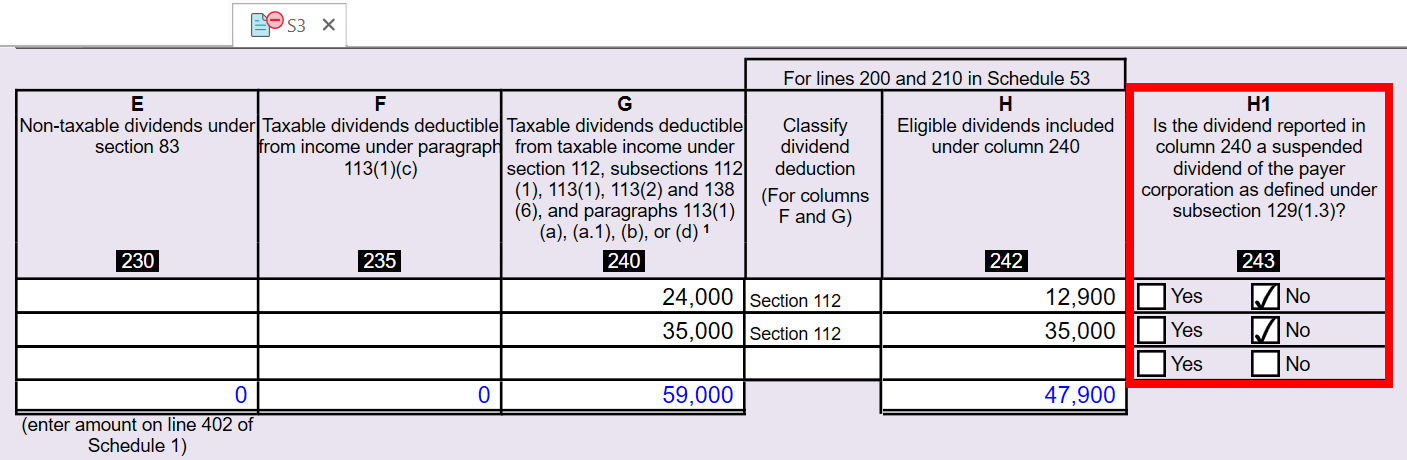
Added column 243 (H1) to the Part 1 table to indicate whether dividends received are suspended dividends. You must answer the question in column 243.
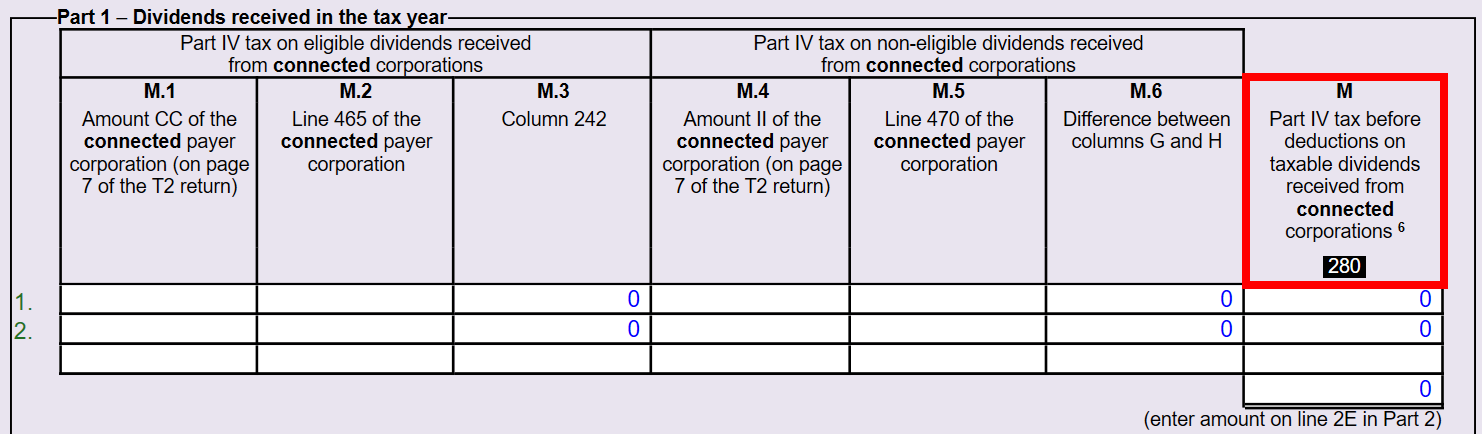
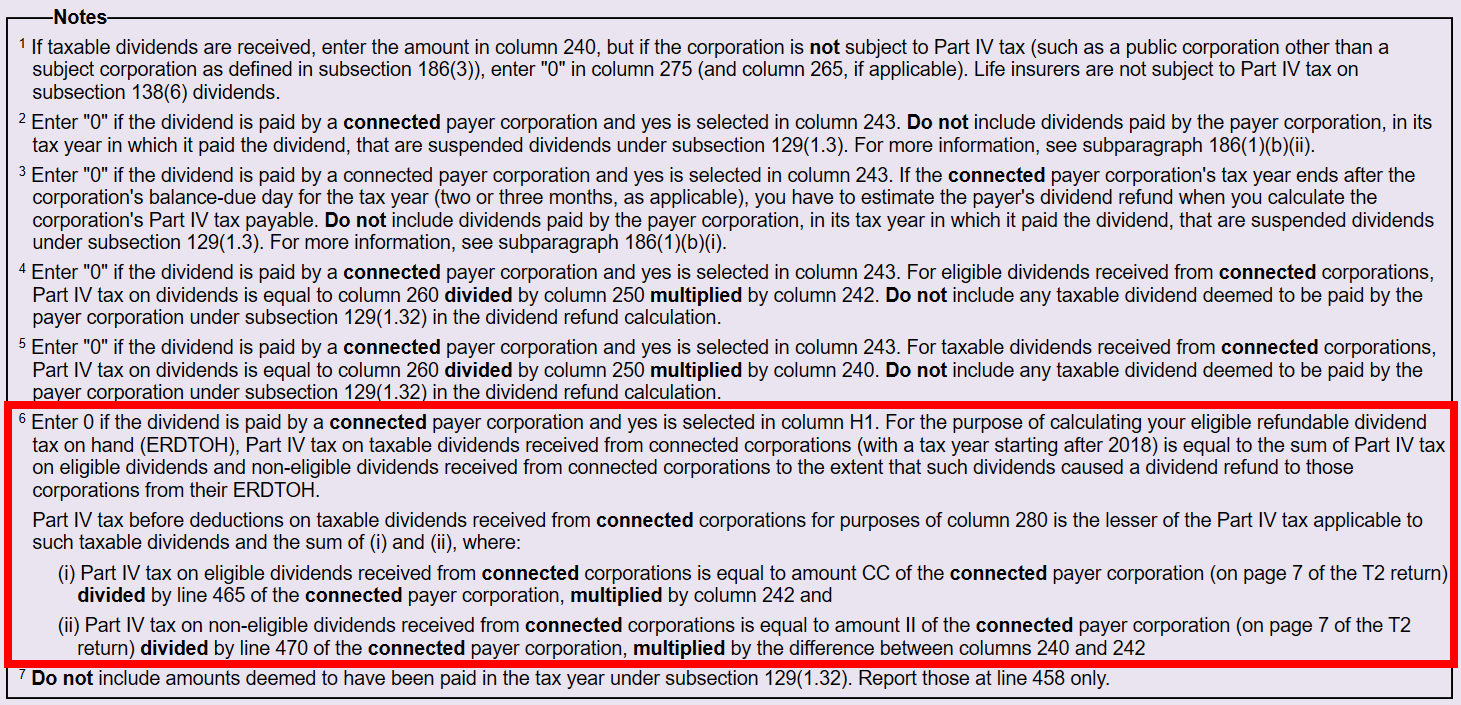
Added on-screen columns M.1 to M.6 to help you calculate column 280 (M) for dividends received from connected payer corporations (see Note 6). When you open an existing return, TaxCycle retains the amount in column 280 (M) as an override. For new files, complete columns M.1 to M.6.
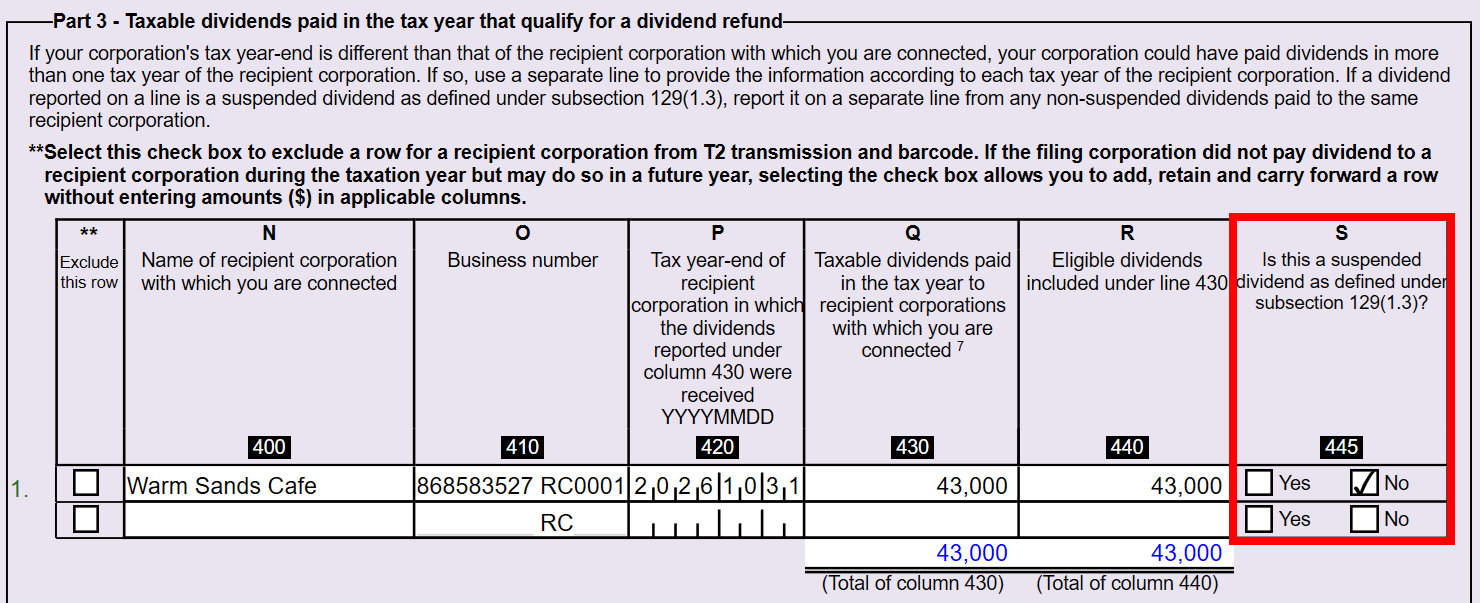
Added column 445 (S) to the Part 3 table to indicate whether dividends paid are suspended dividends. For those dividends, you must answer the question in column 445.
Added lines 451, 3A, 456, 457, 458 and 459 to Part 3, and on-screen fields to calculate line 455.
Added lines 570 and 580 to Part 4.
S3SuspendedDividendWS
As proposed in Bill C-31, if a payer corporation’s paid dividend is suspended during its taxation year, its dividend refund is automatically suspended. The refund is released to the payer corporation only when the conditions under subsection 129(1.32) of the Act are satisfied. See the Explanatory Notes and example below for more information.
When you carry forward a T2 return, the suspended dividend information recorded in Part 3 of S3 carries forward and is added to the tables in S3SuspendedDividendWS. If specific dividends are released in later years under subsection 129(1.32) of the Act, indicate this by checking this box. The suspended dividend information will then not be retained when the return is carried forward to the next year.
ExampleInvestment Inc. (Investco)
Tax year: January 1, 2025 – December 31, 2025
Holding Inc. (Holdco)
Tax year: December 1, 2025 – November 30, 2026
Investco and Holdco are affiliated. Investco pays Holdco a taxable dividend of $100,000, of which $70,000 is eligible dividends. As Holdco received the dividend in a taxation year that ends after Investco’s taxation year, the $100,000 dividend is a suspended dividend under subsection 129(1.3) of the Act.
Investco completes Schedule 3, Part 3 as follows:
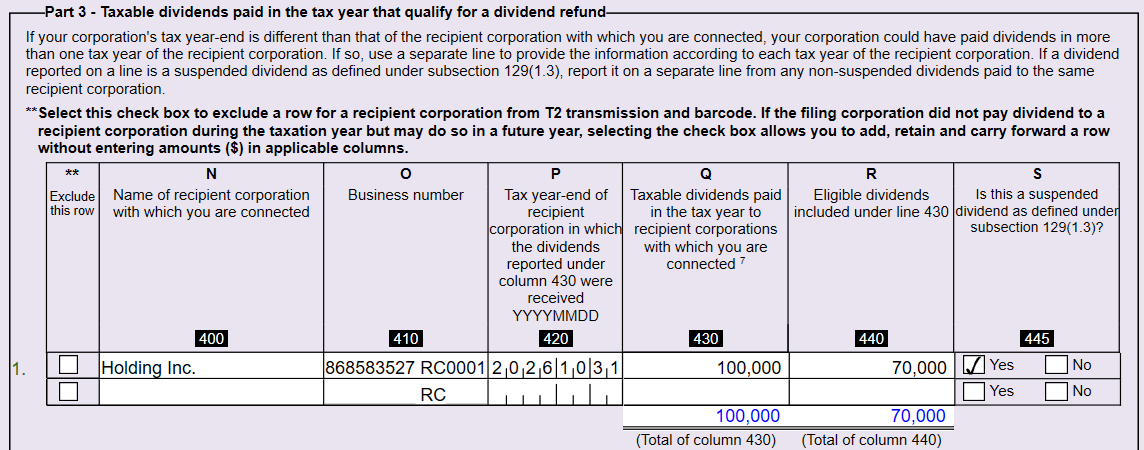
When you carry the file forward, TaxCycle completes S3SuspendedDividendWS from the previous year’s Schedule 3 Part 3 table.
If Holdco later pays a taxable dividend to its individual shareholder that satisfies subsection 129(1.32) of the Act, check the box on S3SuspendedDividendWS in Investco’s T2 return for the taxation year ending December 31, 2027. When you carry the 2027 return forward to 2028, the worksheet does not show the suspended dividend information, because the suspended dividend refund was previously released to Investco under subsection 129(1.32) of the Act.
Schedule 5 Tax Calculation Supplementary - Corporations
British Columbia: Added line 684 to the BC section for the British Columbia manufacturing and processing investment tax credit.
Ontario: For existing line 476 (Ontario Shortline Railway Investment Tax Credit), the CRA has informed us that new Schedule 555 is not yet available for electronic filing. To claim the credit on line 476 of Schedule 5, use the Attach-a-Doc web service to provide supporting documents following the T2 transmission. Select “election” from the dropdown menu. See the T2 Attach-a-doc help topic for more information.
Schedule 7 Aggregate Investment Income and Income Eligible for the Small Business Deduction
Schedule 8
Added Capital Cost Allowance (CCA) class 1.5, Temporary immediate expensing—Eligible manufacturing building located in Canada and acquired by the taxpayer after November 3, 2025.
The CCA rate on new additions depends on the tax year end. Short-year proration and the half-year rule don’t apply. The rates are:
Tax year ends before 2030: 100%
Tax year ends in 2030 or 2031: 75%
Tax year ends in 2032 or 2033: 55%
Tax year ends after 2033: 0%
Schedule 16 Patronage Dividend Deduction
Schedule 31 Investment Tax Credit - Corporations
Added the following:
Part 2A: line 397
Part 9: line 386, which calculates as “Yes” when you answer “Yes” to questions 382 or 383 and have entered associated corporation data to Schedule 52.
Part 9: fiscal year date fields and lines 387 to 389, which TaxCycle completes from the new S52 section of the CGI worksheet.
Part 10B: line 402, calculated from column 4 (amounts allocated to the reporting corporation) in the new Schedule 52 table.
Part 12: line 555
Schedule 53 General Rate Income Pool (GRIP) Calculation
Schedule 74 Clean Hydrogen Investment Tax Credit
Line 100 is now a dropdown list instead of an editable text field. The options are:
Added column 108 to the Part 1 table, and columns 612 and 627 to the Part 5 table.
Added a partnership table to new Part 7.
Lines 190 (Part 1), 335 (Part 3), 645 (Part 5) and 760 (Part 6) are now calculated from Part 7 table lines 850, 855, 860 and 865, respectively. If amounts existed on lines 190, 335, 645 and 760, the corresponding Part 7 table lines will override and retain the amount.
Columns 170 and 175 are now calculated from the new on-screen Expected carbon intensity column in the Part 1 table.
Schedule 89 Request for Capital Dividend Account Balance Verification
Added columns for foreign affiliate repatriation per paragraph 89(1)(h) to the tables in Part 2A and Part 2B.
The S89 Special Elections and Returns (SERs) transmission now includes these columns.
The amounts for the new columns are entered on the CDA Current Year and Previous Year worksheets.
Schedule 381 Manitoba Manufacturing Investment Tax Credit
The qualified property description column in the Part 1 table now has column reference 113 and is included in the T2 transmission data.
Added lines 115, 118, 131, 141 and 165.
Removed lines 109, 121, 148 and 149.
Schedule 387 Manitoba Small Business Venture Capital Tax Credit
T661 Scientific Research and Experimental Development (SR&ED) Expenditures Claim (British Columbia)
Added line 360 to Part 3, Total capital BC qualified expenditures in the tax year.
Added a column to Schedule A on page 4 for capital expenditures incurred after December 15, 2024. Total amount N2 flows to line 360 in Part 3.
Updated the calculation of column 858 to use the 2027 maximum CPP annual pensionable earnings amount of $76,700.
Schedule 500 Ontario Corporation Tax Calculation
Schedule 554 Ontario Computer Animation and Special Effects Tax Credit
Alberta AT1 Updates
AT1 Schedule 29, AS29Project, AS29Step Worksheet
Minor Updates
The following forms received minor updates:
AT1 Schedule 17 Alberta Reserves
AT1 Schedule 18 Alberta Dispositions of Capital Property
AT1 Schedule 20 Alberta Charitable Donations & Gifts Deduction
Québec CO-17 Updates
CO-771 Calculation of the Income Tax of a Corporation
For taxation years beginning after April 29, 2026, the Québec small business deduction (SBD) rate increases from 8.3% to 9.3%, and the minimum tax rate applicable to eligible income decreases from 3.2% to 2.2%. Adjusted the calculation of CO-771 line 98i accordingly. See Increase in the Small Business Deduction Rate for more information.
QC13
MR-69 Update
This release updates the MR-69 form (Authorization to Communicate Information or Power of Attorney) to the latest, revamped version from Revenu Québec. The revised form is available in the 2026 T1, T2, T3 and T5013 modules, and the 2024 T3010 module.
Much of the information required to complete the form is the same, but the presentation has changed significantly.
Summary page: The barcode previously on page 3 has moved to a summary page at the beginning of the form, which now has two barcodes. Select the type of authorization (Authorization or Power of Attorney) on this page. Once you select it, TaxCycle shows specific messaging to point out required entries.
Parts 1 and 2: Information about the grantor (the client) and the grantee (the person being authorized) is now broken out depending on whether they are an individual or a business or trust. TaxCycle completes these parts from the Info and Engagement worksheets.
Part 3: Enter the specific information about the authorization being granted here.
For a general authorization or power of attorney, check box 30 and continue to Part 4.
For a limited authorization or power of attorney for specific tax legislation or documentation, two tables in which you select codes for those items replace the previous series of check boxes. The dropdown code lists for Parts 3.2.2 and 3.3 are in the instructions on pages 6 and 7.
The tables in Parts 3.2.2 and 3.3 allow 11 and 14 entries, respectively. When you have used all the entries, TaxCycle shows a link below the table that takes you to a supplemental form where you can add more codes for that part.
Part 6: If the client requires more than one person to sign, a link below the signature field takes you to an additional signatories form.
If you transmit the MR-69 electronically to Revenu Québec, you must:
If you use the supplemental form or the MR-69 Additional signatories form, you should also attach a copy of it, as you would if you were mailing the form to Revenu Québec. Scan and attach the additional signatories form once you have signed and dated it.
Other Updates
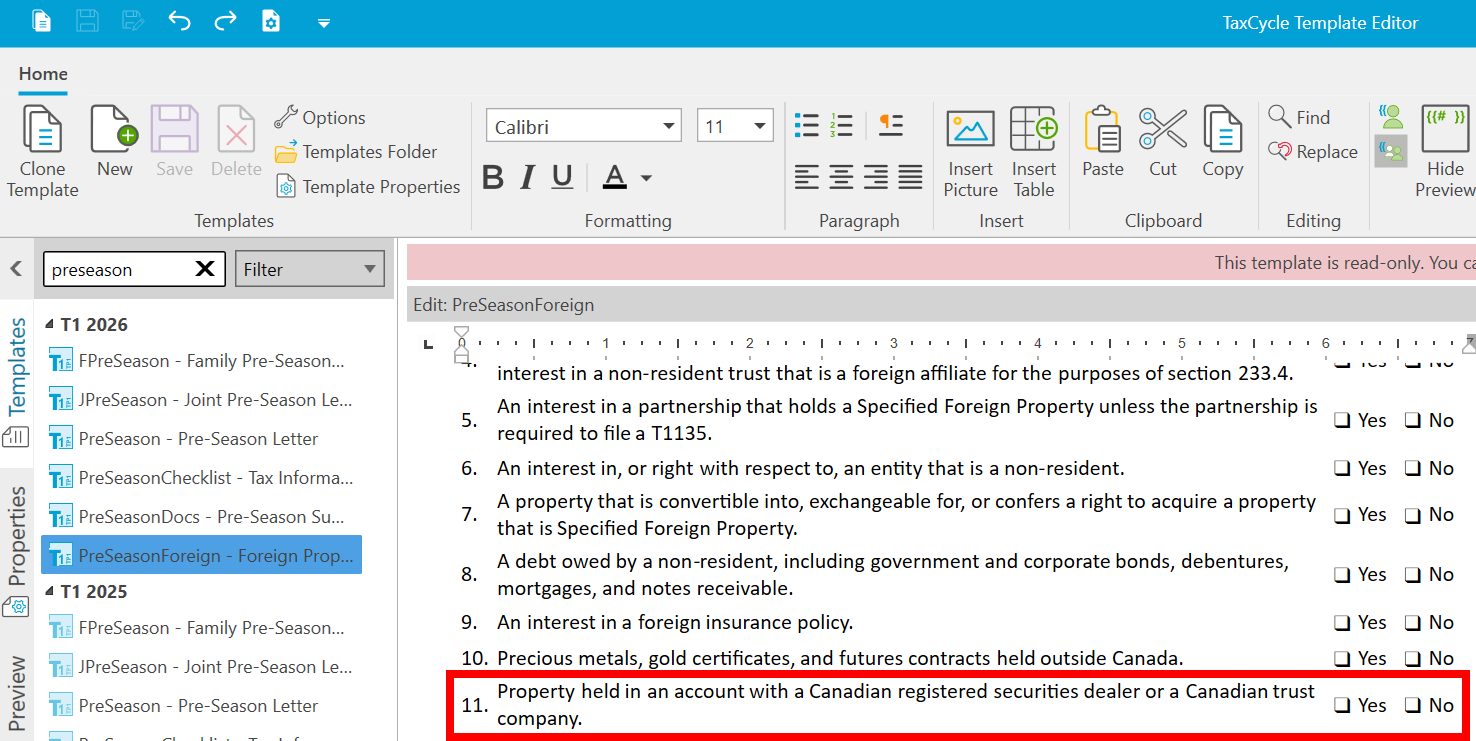
Customer Request T1 2025 and 2026—Added new question 11 to the PreSeasonForeign snippet template.
T1 2026—Removed AuthRep transmission, including the AuthRep Results and AuthRep Declaration forms, the AuthReceipt letter template, the “AuthRep transmitted” workflow item, the related review messages and the print set availability option.
T1, T2, T3, T5013 2026 and T3010 2024—Updated MR-69 (Authorization to Communicate Information or Power of Attorney) to the latest version from Revenu Québec.
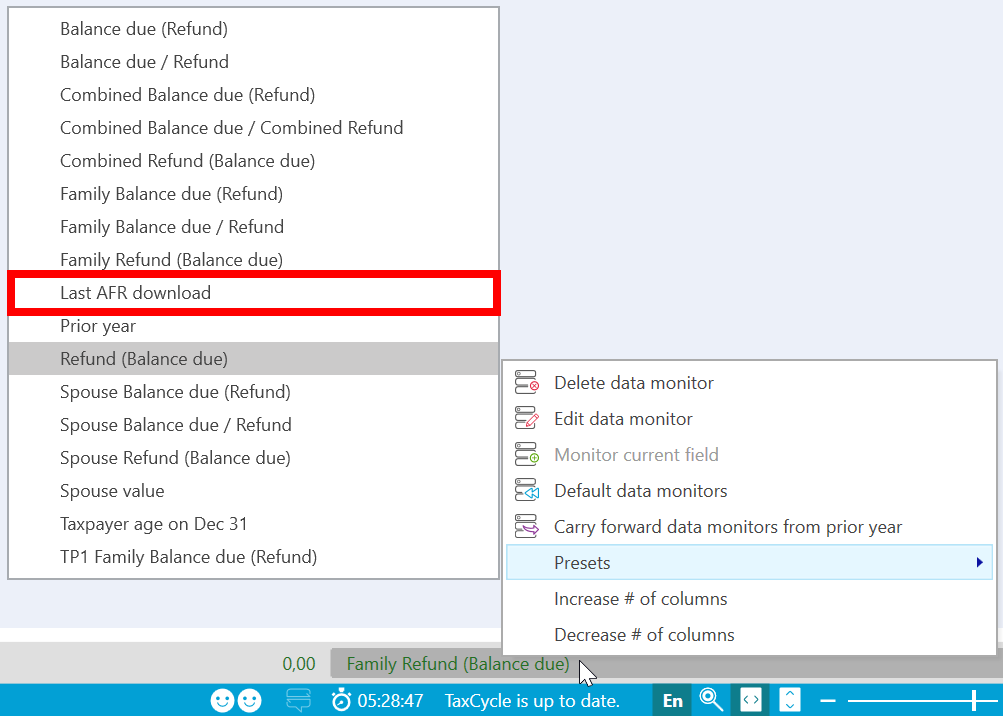
Customer Request Review Tools—Added Last AFR download as a preset data monitor as requested by an attendee at the TaxCycle Seminar.
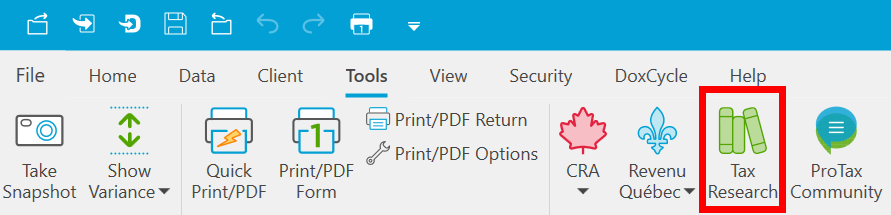
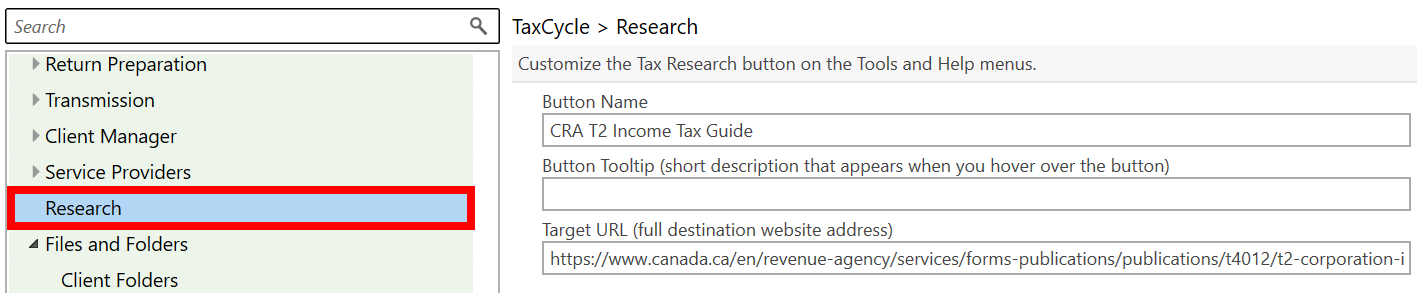
TaxCycle Ribbon—Renamed the EverGreen button in the Tools and Help menus to Tax Research. The button still opens Knowledge Bureau’s EverGreen Explanatory Notes© by default. You can customize the button name and target URL in Research options.
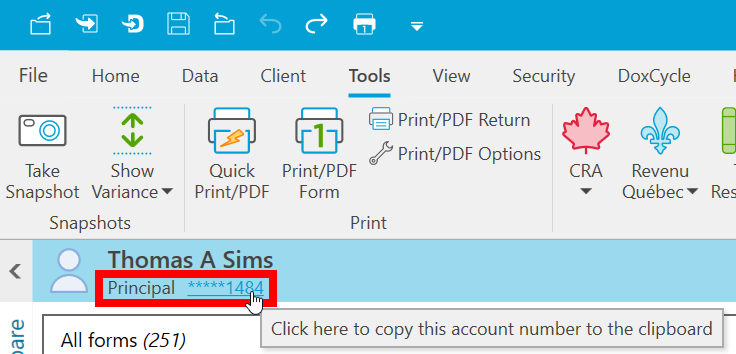
TaxCycle Sidebar—TaxCycle now masks the taxpayer’s social insurance number (SIN) in the sidebar, showing only the last four digits. Click the SIN to copy the full number to your clipboard.
Resolved Issues
Customer Reported E-signatures—Resolved an issue where electronic signature request emails sent through TaxFolder contained the print-and-sign instructions instead of the electronic signature instructions.
T1 2026—Fixed an issue where selecting “Valid authorization already on file and accepted by CRA” on the AuthRep or Engagement worksheet did not automatically complete the “AuthRep signed and on file” workflow item.