Updated: 2026-03-02
TaxCycle version 15.1.60757.0 enables you to connect your Microsoft 365® (Outlook) account directly to TaxCycle for seamless email transmission.
When connecting your Microsoft account for the first time, you may encounter an approval step depending on your organization’s security policies. This article outlines the connection process and clarifies what to expect during configuration.
Background
TaxCycle uses Microsoft’s secure OAuth 2.0 authentication for this integration. This industry-standard protocol, also used by Microsoft Teams, Zoom, and Slack, ensures that your credentials remain secure and that TaxCycle only accesses the permissions required to send emails on your behalf.
Email Hosting Requirements
To use this integration, your email account must be hosted on Microsoft 365 (Exchange Online).
If your email is hosted by a different provider (such as Google Workspace, a third-party SMTP provider, or an on-premise mail server), you may encounter errors. This is a technical limitation of the Microsoft Graph Mail.Send API, which only supports mailboxes hosted on Microsoft 365 (Exchange Online).
If your email account is hosted elsewhere:
If you are unsure whether your account is hosted on Microsoft 365 (Exchange Online), ask your IT administrator.
Personal Microsoft Accounts
If you are using a personal Microsoft account (e.g., @outlook.com, @hotmail.com, @live.ca), no additional approval is required. You can connect your account directly to TaxCycle. For more information, see the Microsoft 365® (Outlook) Integration help topic.
Microsoft Professional (Work or School) Accounts
If your organization uses Microsoft 365 or Microsoft Entra ID (formerly Azure Active Directory), you may encounter one of the following prompts during the connection process:
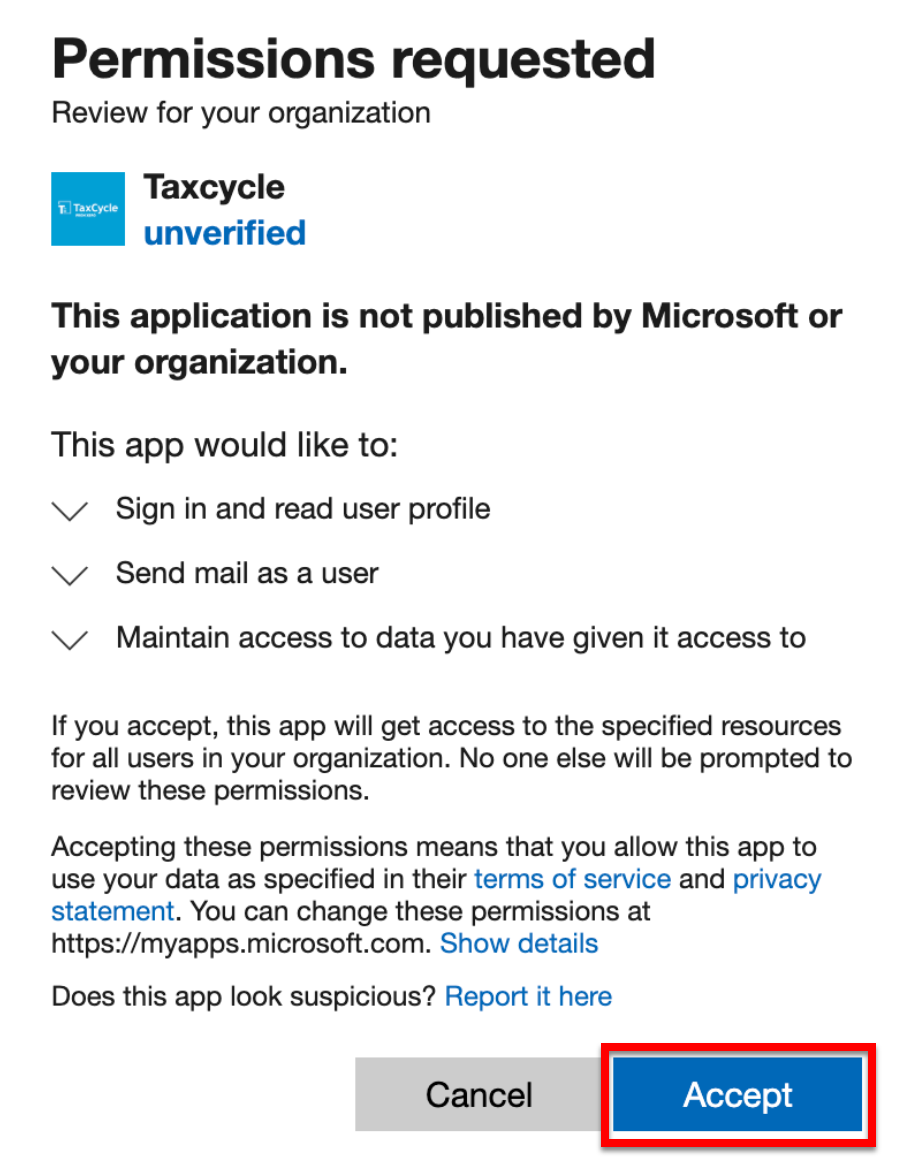
“Permissions requested”
If you see this screen, simply click Accept to complete the connection. This confirms that you are granting TaxCycle permission to send email on your behalf. It does not provide TaxCycle access to other users’ data in your organization.
“Approval required”
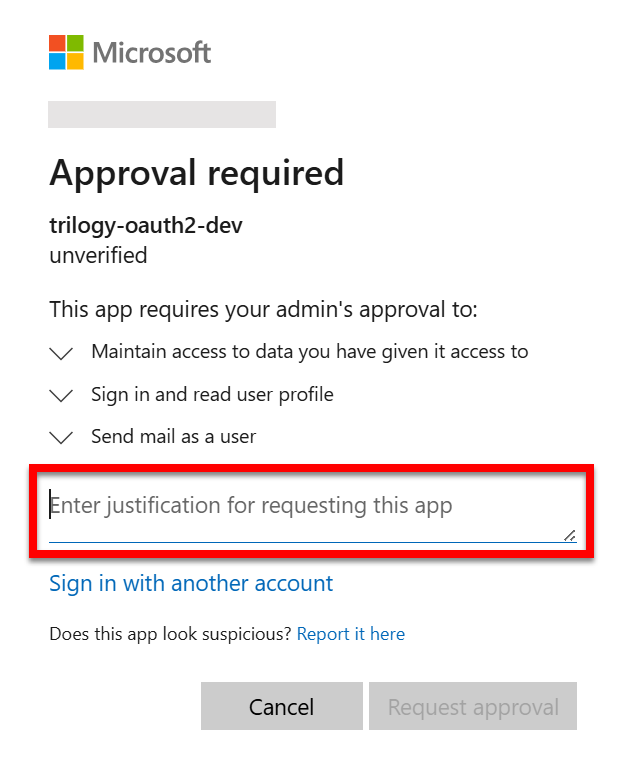
Some organizations require an administrator to approve new applications. If this applies to your organization, you will see an “Approval required” message.
You can submit a request directly through the prompt by entering your request in the “Enter justification for requesting this app” field and then clicking “Request approval.” Once submitted, your IT administrator will be notified to review the request.
Frequently Asked Questions
Will TaxCycle have access to all users’ emails in my organization?
No. TaxCycle only has access to the accounts of users who have individually signed in and connected their Microsoft account. Admin consent simply removes the approval barrier—it does not grant access to any user’s data.
Can I revoke access later?
Yes. An administrator can revoke consent at any time through the Azure Portal under Microsoft Entra ID > Enterprise Applications > TaxCycle > Permissions. Individual users can also disconnect their account from within TaxCycle or at https://myapps.microsoft.com.
Why does TaxCycle show as “unverified”?
TaxCycle is in the process of completing Microsoft’s publisher verification. This does not affect the security of the application—it is a standard verification badge program. Your data is protected by Microsoft’s OAuth 2.0 framework regardless of verification status.
What if my organization doesn’t use Microsoft accounts?
TaxCycle also supports connecting with Google. See the Gmail® Integration help topic to learn more.
Need Help?
If you have any further questions regarding this integration, please contact our support team. We are happy to work with you and your IT team to complete the setup.