Template Files and Folders
Templates Files
Built-in templates are part of TaxCycle and are not saved in a separate file until you clone them. After cloning they are either saved to your templates folder or to the active Options Profile with the file extension .taxcycletemplate. However, the underlying template code is in HTML and CSS, and TaxCycle also recognizes files with the .html extension.
Any images inserted into a template are saved in the template file, as part of the HTML code, rather than as a relative link. Logos and signatures added on the Correspondence page in options are saved in the Options Profile or local options folder.
Templates Folder
When you share templates in an Options Profile zip file, TaxCycle stores the template file a subfolder called Templates.
If you choose to store on your local computer or in a network folder, rather than an Options Profile, TaxCycle saves them to C:\ProgramData\Trilogy\TaxCycle\Templates by default. You can change this path to point to a network folder to share templates with others. For example, \\MyComputer\Templates. To make modifications to templates, you must have read/write permissions on the folder.
To change where your custom templates are stored:
- To open Options from the Start screen, click Options in the blue bar on the left side of the window. If you have a file open, go to the File menu, then click Options.
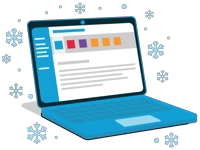
- On the left side of the dialog box, expand Files and Folders and click on Template Files.
- Browse to change the path to the Templates folder to a different location on your network. If you are sharing this path in an Options Profile, make sure you use a UNC file path so that other computers can find it. For example, \\MyComputer\Templates
- Click the Share link to share the Windows® folder with others on your network.
- Click the View files link to open the folder in Windows® File Explorer.
- To store the template files in the active Options Profile or to add them to the local options folder instead, click the Copy folder to… link. (The name of the location where the files will be placed changes based on whether you are currently using an Options Profile or local options.)
- Click Use default to use the default location for the files, but not to copy the files to that default location.
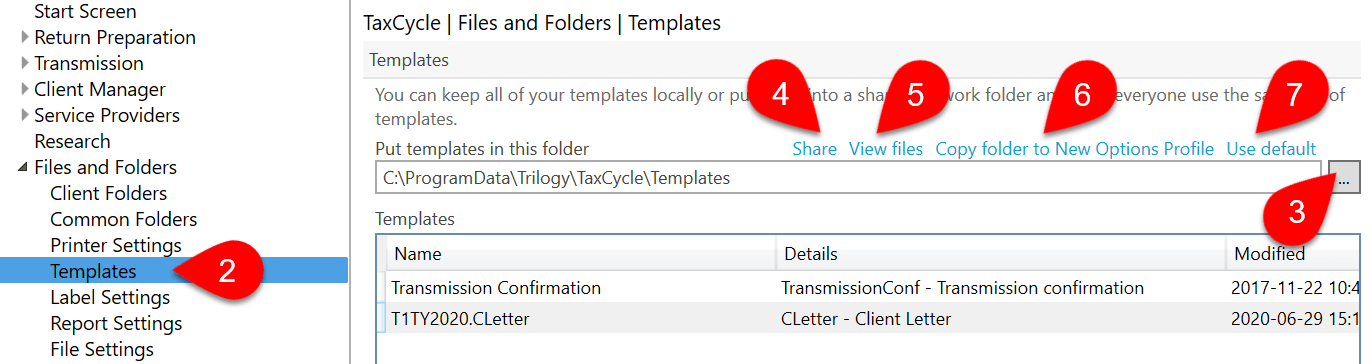
- If your files are already stored in an Options Profile or default folder, the path will start with the words PROFILE rather than a drive letter or server name.
- The list at the bottom of the page shows all the template files stored in the folder or Options Profile.