TaxCycle

Authorization Options

Updated: 2025-11-26

Both the Canada Revenue Agency (CRA) and Revenu Québec require authorization for online access to download and view information about your client, using services like the Auto-fill my return (AFR) and Tax Data Download (TDD). You can also request authorization to change their account on their behalf.

Preparer and Firm Authorization Details (RepID, GroupID)

Enter defaults required for the completion of authorization forms in Options.

  1. To open Options, go to the File menu, then Options. Or, if you are on the Start screen, click Options in the blue bar on the left.
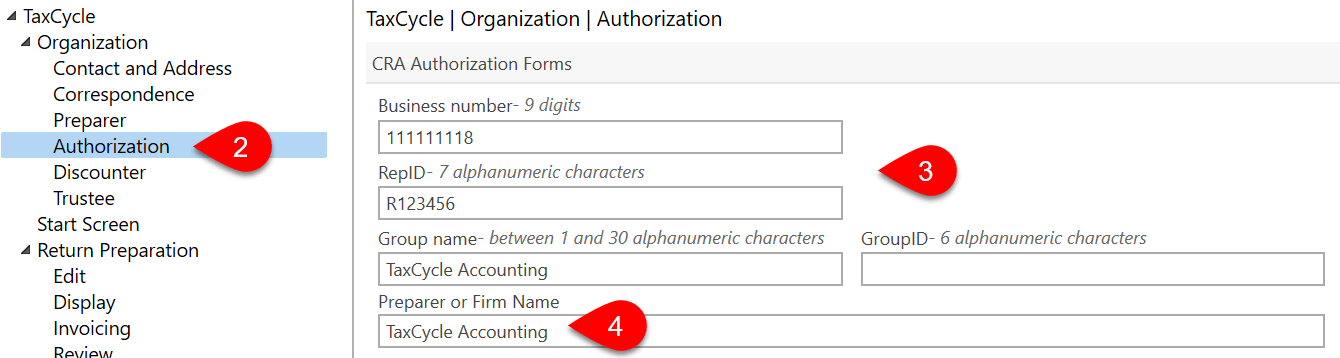
  2. On the left, expand the Organization section and click on the Authorization page.
  3. In the CRA Authorization Forms section, enter your firm’s Business number, RepID, Group name and GroupID, as required. These eventually flow to worksheets for requesting authorization (such as the AuthRepBus).
  4. If you need to use a different Preparer or Firm Name on these authorization forms, enter that name on this page. This information then flows to the related field in the Preparer / Firm Representative section on the Engagement worksheet.

Revenu Québec Authorization Options

Enter defaults required for the completion of MR-69 in Options. To learn more about filing the MR-69 with Revenu Québec, read the Québec MR-69 Authorization help topic.

  1. To open Options, go to the File menu, then Options. Or, if you are on the Start screen, click Options in the blue bar on the left. The settings below are accessible from the section on the left-hand side of the Options dialog box.
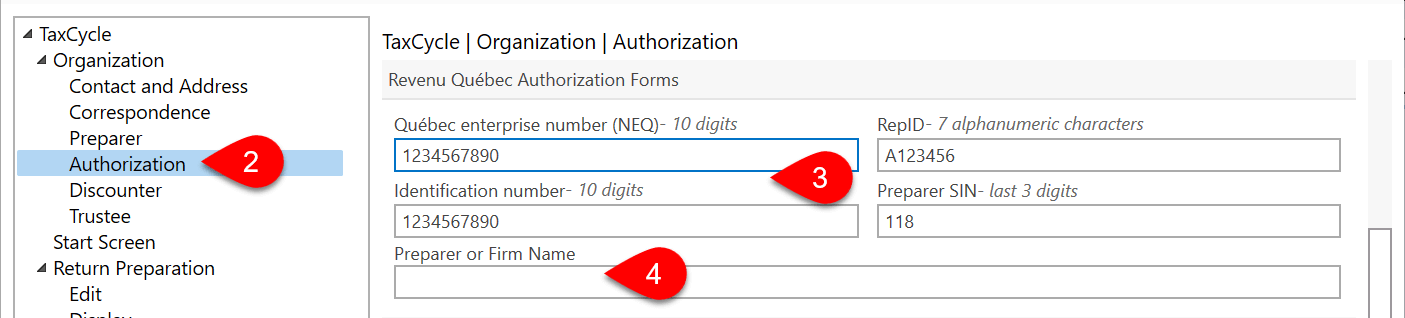
  2. On the left, expand the Organization section and click on the Authorization page.
  3. In the Revenu Québec Authorization Forms section, enter your firm’s Québec enterprise number (NEQ), Identification number, RepID, last three digits of the Preparer SIN.
  4. If you need to use a different Preparer or Firm Name on the MR-69, enter that name on this page.
  5. This information populates the Preparer / Firm Representative section on the Engagement worksheet and flows to the MR-69.

New File Defaults for the MR-69


TaxCycle enters these values on the MR-69 form when you create or carry forward a file. It also triggers a review message if the form doesn’t match the default set in options. To learn more about filing the MR-69 with Revenu Québec, read the Québec MR-69 Authorization help topic.

  1. From the Start screen, click Options in the blue bar on the left side. If you have a file open, go to the File menu, then click Options.
  2. On the left, expand T1/TP1 (or another module) and click on New File to apply the settings to all years. To set different options for a particular year, expand the section and click on a year.
  3. On the right, scroll until you see the section for MR-69 Default values.
  4. Set the default Authorization Type: Power of attorney allows the authorized person to make changes to the client’s tax return, while Authorization does not (it only allows access to information about the client). When you create a new return and set the province of residence to Québec, the Authorization Type is set in the MR-69 section on the Engagement worksheet. This then flows to the MR-69 form.
  5. Select an option under Signing Date:
    1. Choose No default to leave the check boxes at the top of the MR-69 blank and manually enter the signing date on the Info worksheet.
    2. Choose Insert the current date when printing to check the box near the signing field on the MR-69 that tells TaxCycle to insert the date when you print the form.
    3. If you select Enter the signing date manually or leave it blank, TaxCycle leaves the field blank for you to manually enter the information.